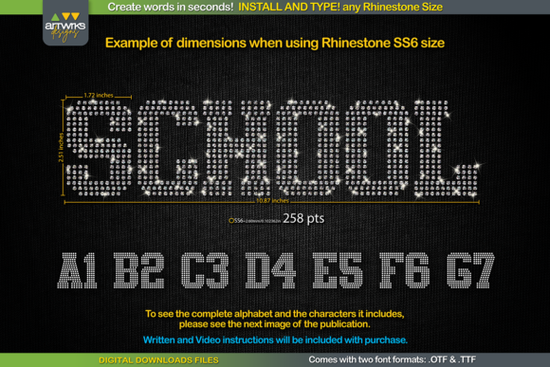
If you're looking for a quick, reliable way to add rhinestone text to t-shirts, tote bags, or heat transfer vinyl projects, the RS02 Atletico TTF RHINESTONE Template Font is built for exactly that. It’s not a design file you trace or layer manually it’s a real, installable font that types rhinestone-filled letters straight into your software. No complex masking, no alignment guesswork. Just type, size correctly, and cut.
How does this rhinestone font actually work?
This isn’t a decorative font with sparkly outlines. Each character in the RS02 Atletico TTF RHINESTONE Template Font is pre-arranged with precise rhinestone placement like tiny dots spaced evenly across every letter shape. When you type “TEAM” or “CHAMP,” the letters appear already filled with circles sized for SS6, SS10, SS16, or SS20 hotfix stones. That spacing also works for HTV trapping, meaning the design holds together cleanly when weeded and pressed.
The font comes in both .TTF and .OTF formats, so it runs smoothly on Windows, Mac, iPad, and iPhone. It’s compatible with Cricut Design Space, Silhouette Studio, Adobe Illustrator, Inkscape, and most other vector or cutting software as long as the program supports system-installed fonts.
What size should I use for my rhinestones?
Unlike regular fonts, rhinestone templates need specific point sizes to match stone diameters. The RS02 Atletico font includes recommended sizing guidance:
- SS6 stones (2.3mm): Set font size to 189 pt
- SS10 stones (2.8mm): Use 241 pt
- SS16 stones (4.0mm): Go with 295 pt
- SS20 stones (4.8mm): Try 388 pt
Note: Cricut Design Space sometimes resizes fonts automatically after typing, which can throw off stone spacing. If that happens, just reselect the text and manually reset the size using the values above no need to redraw anything.
Who is this font best for?
This is especially helpful for crafters who make custom apparel for sports teams, school events, or small-batch POD shops. Since each letter is self-contained and pre-trapped, it saves time over building rhinestone layouts from scratch in Silhouette Studio or Illustrator. It’s also ideal for beginners learning how to prep rhinestone transfers there’s less room for error in spacing or stone density.
Small businesses selling personalized jerseys or cheer gear often reuse the same phrases (“VARSITY,” “CAPTAIN,” “2024 CHAMPS”). With this font, those words are always consistent, scalable, and ready to cut no redesigning needed each time.
What’s included in the download?
You’ll get a ZIP file containing:
- The RS02 Atletico TTF RHINESTONE Template Font in both .TTF and .OTF
- A PDF with sizing charts and visual examples showing how each stone size fits inside the letters
- Step-by-step installation instructions for Windows, Mac, and mobile devices
- Quick tips for adjusting size in Cricut Design Space if automatic scaling interferes
There’s no subscription, no monthly fee just a one-time purchase and immediate access to the files.
Can I use it with other rhinestone fonts?
Yes and if you’re building a collection, you might also like the RS01 Rhinestone Template Font or the RS03 Rhinestone Slab Font, both designed by ArtWorks Designs for similar use cases. Each has its own letter spacing and stylistic feel, so mixing them gives variety without sacrificing function.
Keep in mind: this font only includes the characters shown in the preview images uppercase A–Z, numbers 0–9, and basic punctuation like ! ? and -. It doesn’t support accented characters or extended Unicode sets, so double-check your text before sending to cut.
Getting started in 5 simple steps
- Download and unzip the file
- Right-click the .TTF file and choose Install for all users
- Open your design software (Cricut Design Space, Silhouette Studio, etc.)
- Type your word, select RS02 Atletico from the font menu, and set the size based on your stone
- Ungroup if needed (some programs auto-group), then send to your cutter or print-and-cut workflow
Once installed, you’ll see it listed under “RS02 Atletico” not “Rhinestone” or “Template,” so look for the full name. And remember: if your letters look too sparse or crowded, it’s almost always a font-size issue, not a problem with the file itself.
Learn More American Spirit Fonts: Design Ideas and Examples
 Faither: a Versatile Font for Creative Projects
 Bellinda: Elegant Modern Calligraphy for Digital Projects
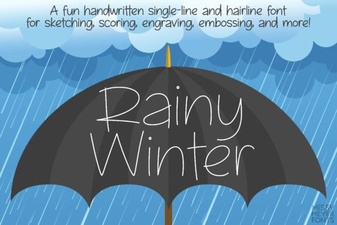 Rainy Winter Font Ideas for Craft Projects
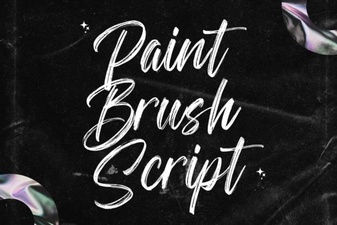 Hand Lettering Projects Using Brush Fonts
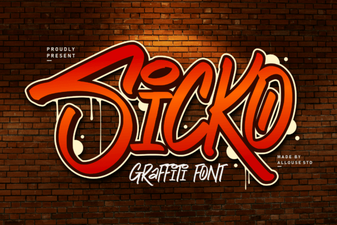 Sicko Font: Creative Design & Download Guide